表单登录
Spring Security 支持通过 HTML 表单提供用户名和密码。 本节详细介绍了基于表单的身份验证在 Spring Security 中的工作原理。
本节探讨基于表单的登录在 Spring Security 中的工作原理。 首先,我们来看用户是如何被重定向到登录表单的:
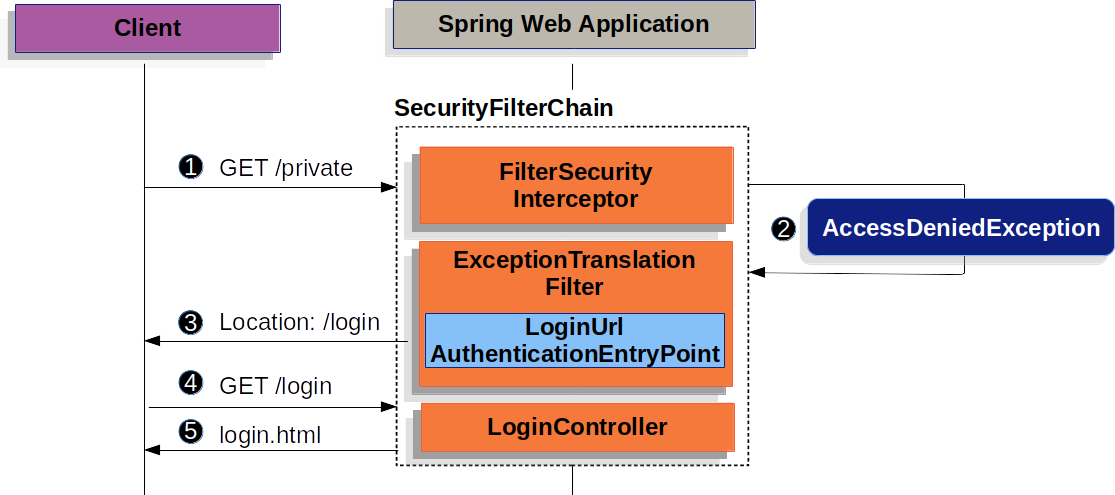
上图基于我们的 SecurityFilterChain 图构建。
 首先,用户向资源发送未经身份验证的请求 (
/private) 对于其未获授权的情况。
 Spring Security 的
AuthorizationFilter表示未认证的请求是拒绝访问通过抛出AccessDeniedException.
 由于用户未通过身份验证,
ExceptionTranslationFilter启动开始身份验证并将重定向发送到配置好的登录页面AuthenticationEntryPoint.
在大多数情况下,AuthenticationEntryPoint是LoginUrlAuthenticationEntryPoint.
 浏览器请求其被重定向到的登录页面。
 应用程序中的某些内容,必须渲染登录页面.
当用户名和密码被提交时,UsernamePasswordAuthenticationFilter 会从 UsernamePasswordAuthenticationToken 实例中提取用户名和密码,并创建一个 https://docs.spring.io/spring-security/reference/servlet/authentication/architecture.html#servlet-authentication-authentication,该对象属于一种 Authentication 类型。
UsernamePasswordAuthenticationFilter 继承自 AbstractAuthenticationProcessingFilter,因此下图看起来应该非常相似:
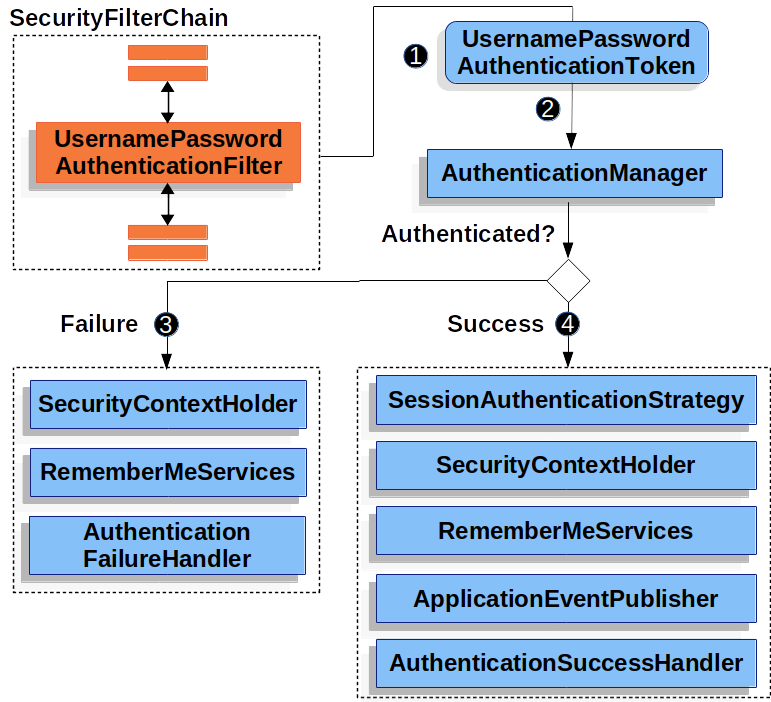
该图基于我们的 SecurityFilterChain 图表构建。
当用户提交用户名和密码时,UsernamePasswordAuthenticationFilter创建UsernamePasswordAuthenticationToken,这是一种类型的Authentication,通过提取用户名和密码从HttpServletRequest实例。
接下来,UsernamePasswordAuthenticationToken被传递到AuthenticationManager待认证的实例。
关于内容的详细信息AuthenticationManager看起来取决于用户信息已存储.
如果身份验证失败,则失败.
-
SecurityContextHolder 已被清空。
-
RememberMeServices.loginFail被调用。 如果未配置“记住我”功能,此操作将无效果。 请参阅 Javadoc 中的RememberMeServices接口。 -
AuthenticationFailureHandler被调用。 请参阅 Javadoc 中的AuthenticationFailureHandler类
如果认证成功,则成功.
-
SessionAuthenticationStrategy会收到新登录的通知。 请参阅 Javadoc 中的SessionAuthenticationStrategy接口。 -
认证已设置在 SecurityContextHolder 上。 请参阅 Javadoc 中的
SecurityContextPersistenceFilter类。 -
RememberMeServices.loginSuccess被调用。 如果未配置“记住我”功能,此操作将无效果。 请参阅 Javadoc 中的RememberMeServices接口。 -
ApplicationEventPublisher发布一个InteractiveAuthenticationSuccessEvent。 -
AuthenticationSuccessHandler被调用。通常,这是一个SimpleUrlAuthenticationSuccessHandler,它会重定向到由ExceptionTranslationFilter在重定向到登录页面时保存的请求。
默认情况下,Spring Security 的表单登录是启用的。 然而,一旦提供了任何基于 Servlet 的配置,就必须显式地配置基于表单的登录。 以下示例展示了一个最小化的显式 Java 配置:
-
Java
-
XML
-
Kotlin
public SecurityFilterChain filterChain(HttpSecurity http) {
	http
		.formLogin(withDefaults());
	// ...
}
<http>
<!-- ... -->
<form-login />
</http>open fun filterChain(http: HttpSecurity): SecurityFilterChain {
http {
formLogin { }
}
// ...
}在上述配置中,Spring Security 会渲染一个默认的登录页面。 大多数生产应用程序都需要自定义登录表单。
以下配置演示了如何提供自定义登录表单。
-
Java
-
XML
-
Kotlin
public SecurityFilterChain filterChain(HttpSecurity http) {
	http
		.formLogin((form) -> form
			.loginPage("/login")
			.permitAll()
		);
	// ...
}
<http>
<!-- ... -->
<intercept-url pattern="/login" access="permitAll" />
<form-login login-page="/login" />
</http>open fun filterChain(http: HttpSecurity): SecurityFilterChain {
http {
formLogin {
loginPage = "/login"
permitAll()
}
}
// ...
}当在 Spring Security 配置中指定了登录页面时,您需要负责渲染该页面。
以下 Thymeleaf 模板生成一个符合 /login 登录页面要求的 HTML 登录表单:
<!DOCTYPE html>
<html xmlns="http://www.w3.org/1999/xhtml" xmlns:th="https://www.thymeleaf.org">
	<head>
		<title>Please Log In</title>
	</head>
	<body>
		<h1>Please Log In</h1>
		<div th:if="${param.error}">
			Invalid username and password.</div>
		<div th:if="${param.logout}">
			You have been logged out.</div>
		<form th:action="@{/login}" method="post">
			<div>
			<input type="text" name="username" placeholder="Username"/>
			</div>
			<div>
			<input type="password" name="password" placeholder="Password"/>
			</div>
			<input type="submit" value="Log in" />
		</form>
	</body>
</html>
关于默认的 HTML 表单,有几点关键内容:
-
表单应向
post发起/login请求。 -
表单需要包含一个CSRF Tokens,该Tokens由 Thymeleaf 自动包含。
-
表单应在一个名为
username的参数中指定用户名。 -
表单应在一个名为
password的参数中指定密码。 -
如果找到名为
error的 HTTP 参数,则表示用户未能提供有效的用户名或密码。 -
如果找到名为
logout的 HTTP 参数,则表示用户已成功注销。
许多用户只需要自定义登录页面就足够了。 然而,如有需要,您可以通过额外的配置来自定义前面提到的所有内容。
如果你使用 Spring MVC,你需要一个控制器,将 GET /login 映射到我们创建的登录模板。
以下示例展示了一个最简化的 LoginController:
-
Java
-
Kotlin
@Controller
class LoginController {
	@GetMapping("/login")
	String login() {
		return "login";
	}
}
@Controller
class LoginController {
@GetMapping("/login")
fun login(): String {
return "login"
}
}