附录
附录 A:本文档使用的材料
示例中使用的虚拟 UserDetailsService,因为我们没有真实的用户数据源。
public class DummyUserDetailsService implements UserDetailsService {

    @Override
    public UserDetails loadUserByUsername(String username)
            throws UsernameNotFoundException {
        return new User(username, "notUsed", true, true, true, true,
                AuthorityUtils.createAuthorityList("ROLE_USER"));
    }

}
附录 B:Kerberos 快速入门
在任何身份验证过程中,通常涉及三方。
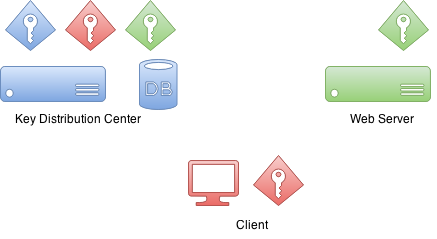
首先是client(客户端),它有时指客户端计算机,但在大多数场景中,实际上是指坐在计算机前并尝试访问资源的用户。其次是用户试图访问的resource(资源)。在本例中,该资源是一台Web服务器。
此外还有一个Key Distribution Center(KDC)。在 Windows 环境中,这通常是一个Domain Controller。KDC才是真正将所有组件整合在一起的核心,因此也是您环境中最关键的组件。正因如此,它也被视为一个单点故障。
最初在设置Kerberos环境并将域用户主体创建到数据库中时,也会同时生成加密密钥。这些加密密钥基于共享密钥(即用户密码),而实际密码永远不会以明文形式保存。
实际上,KDC拥有自己的密钥以及用于域用户的其他密钥。
有趣的是,在认证过程中,resource 与 KDC 之间没有通信。
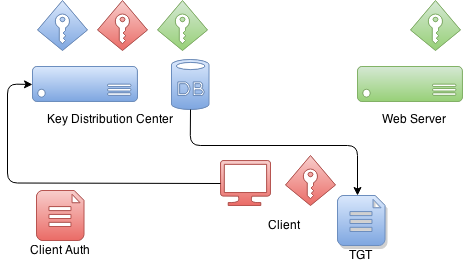
当客户端想要使用resource(资源)进行身份验证时,首先需要与KDC(密钥分发中心)通信。Client(客户端)将构造一个包含加密部分和未加密部分的特殊数据包。未加密部分包含例如用户的相关信息,而加密部分则包含协议所需的其他信息。Client将使用其自身的密钥对数据包内容进行加密。
当
KDC 返回给客户端的是一个称为 Ticket Granting
Ticket 的ticket,该ticket由 KDC 自身的私钥签名。稍后当 client 将此ticket发送回时,它可以尝试解密它,并且如果该操作成功,则知道这是一张它自己最初签发并给到 client 的ticket。
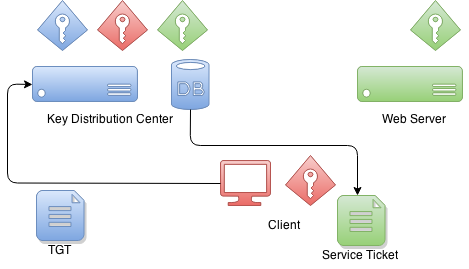
当客户端想要获取一个可用于向服务进行身份验证的ticket时,会将TGT发送给KDC,然后client使用该服务自身的密钥对服务ticket进行签名。此时便建立了service与service之间的信任关系。该服务ticket包含的数据只有5自身才能解密。
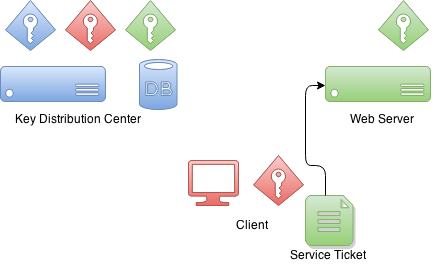
当client正在与一个服务进行身份验证时,它会向该服务发送之前收到的服务ticket。然后,该服务认为我不了解这个人,但他给了我一个认证ticket。
接下来,service可以尝试解密这个ticket。如果这个操作成功了,那么它就知道只有知道我的凭据的其他方才是KDC(密钥分配中心),因为我也信任他,所以我也可以相信这个客户端就是它声称的那个客户端。
附录 C:设置 Kerberos 环境
本文档不涉及 Kerberos 环境的生产环境部署,但本附录提供了一些帮助,以指导您开始设置开发所需的组件。
设置 MIT Kerberos
第一步是设置一个新的领域(realm)和一个数据库。
# kdb5_util create -s -r EXAMPLE.ORG
Loading random data
Initializing database '/var/lib/krb5kdc/principal' for realm 'EXAMPLE.ORG',
master key name 'K/[email protected]'
You will be prompted for the database Master Password.
It is important that you NOT FORGET this password.
Enter KDC database master key:
Re-enter KDC database master key to verify:
kadmin 命令可用于管理 Kerberos 环境,但您目前还无法使用它,因为数据库中尚无管理员用户。
root@neo:/etc/krb5kdc# kadmin
Authenticating as principal root/[email protected] with password.
kadmin: Client not found in Kerberos database while initializing
kadmin interface
让我们使用 kadmin.local 命令来创建一个。
root@neo:/etc/krb5kdc# kadmin.local
Authenticating as principal root/[email protected] with password.

kadmin.local:  listprincs
K/[email protected]
kadmin/[email protected]
kadmin/[email protected]
kadmin/[email protected]
krbtgt/[email protected]

kadmin.local:  addprinc root/[email protected]
WARNING: no policy specified for root/[email protected]; defaulting to
no policy
Enter password for principal "root/[email protected]":
Re-enter password for principal "root/[email protected]":
Principal "root/[email protected]" created.
然后通过修改 kadm5.acl 文件并重启 Kerberos 服务来启用管理员权限。
# cat /etc/krb5kdc/kadm5.acl
# This file Is the access control list for krb5 administration.
*/admin *
现在你可以使用之前创建的 kadmin 主体来运行 root/admin 了。让我们创建第一个用户 user1。
kadmin:  addprinc user1
WARNING: no policy specified for [email protected]; defaulting to no
policy
Enter password for principal "[email protected]":
Re-enter password for principal "[email protected]":
Principal "[email protected]" created.
让我们创建第二个用户 user2 并导出一个 keytab 文件。
kadmin:  addprinc user2
WARNING: no policy specified for [email protected]; defaulting to no
policy
Enter password for principal "[email protected]":
Re-enter password for principal "[email protected]":
Principal "[email protected]" created.

kadmin:  ktadd -k /tmp/user2.keytab [email protected]
Entry for principal [email protected] with kvno 2, encryption type aes256-cts-hmac-sha1-96 added to keytab WRFILE:/tmp/user2.keytab.
Entry for principal [email protected] with kvno 2, encryption type arcfour-hmac added to keytab WRFILE:/tmp/user2.keytab.
Entry for principal [email protected] with kvno 2, encryption type des3-cbc-sha1 added to keytab WRFILE:/tmp/user2.keytab.
Entry for principal [email protected] with kvno 2, encryption type des-cbc-crc added to keytab WRFILE:/tmp/user2.keytab.
让我们为 Tomcat 创建一个服务ticket,并将凭据导出到名为 tomcat.keytab 的 keytab 文件中。
kadmin:  addprinc -randkey HTTP/[email protected]
WARNING: no policy specified for HTTP/[email protected];
defaulting to no policy
Principal "HTTP/[email protected]" created.

kadmin:  ktadd -k /tmp/tomcat.keytab HTTP/[email protected]
Entry for principal HTTP/[email protected] with kvno 2, encryption type aes256-cts-hmac-sha1-96 added to keytab WRFILE:/tmp/tomcat2.keytab.
Entry for principal HTTP/[email protected] with kvno 2, encryption type arcfour-hmac added to keytab WRFILE:/tmp/tomcat2.keytab.
Entry for principal HTTP/[email protected] with kvno 2, encryption type des3-cbc-sha1 added to keytab WRFILE:/tmp/tomcat2.keytab.
Entry for principal HTTP/[email protected] with kvno 2, encryption type des-cbc-crc added to keytab WRFILE:/tmp/tomcat2.keytab.
设置 Windows 域控制器
此内容使用 Windows Server 2012 R2 进行了测试
|
互联网上有大量关于如何设置 Windows AD 的优质文章和视频, 但以下这两篇非常有用: Rackspace 和 Microsoft Technet。 |
-
已完成常规的域控制器和 Active Directory 设置。
-
使用的 DNS 域名为
example.org,Windows 域名为EXAMPLE。 -
我创建了多个域用户,例如
user1、user2、user3和tomcat,并将密码设置为Password#。
最后,我还把我的所有虚拟机的IP地址都添加到了AD的DNS服务器中,以避免造成任何问题。
Name: WIN-EKBO0EQ7TS7.example.org
Address: 172.16.101.135

Name: win8vm.example.org
Address: 172.16.101.136

Name: neo.example.org
Address: 172.16.101.1
服务主体名称(SPN)需要使用 HTTP 和运行 Tomcat Servlet 容器的服务器名称 neo.example.org 进行设置。该 SPN 与 tomcat 域用户一起使用,其 keytab 文件随后被用作服务凭据。
PS C:\> setspn -A HTTP/neo.example.org tomcat我导出了 keytab 文件,并将其复制到运行 Tomcat 的 Linux 服务器上。
PS C:\> ktpass /out c:\tomcat.keytab /mapuser [email protected] /princ HTTP/[email protected] /pass Password# /ptype KRB5_NT_PRINCIPAL /crypto All
 Targeting domain controller: WIN-EKBO0EQ7TS7.example.org
 Using legacy password setting method
 Successfully mapped HTTP/neo.example.org to tomcat.
附录 D:故障排查
本附录提供了有关排查错误和问题的通用信息。
|
如果你认为环境和配置已正确设置,请再次仔细检查,并请他人帮忙核查是否存在明显的错误或拼写错误。Kerberos 的配置通常非常脆弱,要调试问题所在并不总是很容易。 |
GSSException: Failure unspecified at GSS-API level (Mechanism level:
Invalid argument (400) - Cannot find key of appropriate type to
decrypt AP REP - RC4 with HMAC)
如果你看到一个提示缺少密钥类型的错误,这会在两种不同的使用场景中发生。首先,你的 JVM 可能不支持相应的加密类型,或者该加密类型在你的 krb5.conf 文件中被禁用了。
default_tkt_enctypes = rc4-hmac
default_tgs_enctypes = rc4-hmac
第二种情况则不那么明显,且难以追踪,因为它会导致相同的错误。如果只是缺少所需的加密密钥,也会抛出这个特定的 GSSException 异常,而这可能是由于 Kerberos 服务器配置错误,或者您的主体(principal)名称中存在简单的拼写错误所导致的。
在大多数系统中,所有命令和库都会从默认位置或特殊位置(例如 JDK)搜索 Kerberos 配置。特别是在 Unix 系统上工作时,很容易造成混淆,因为这些系统可能已经配置了默认设置以配合 MIT Kerberos 使用,而目标环境却是 Windows 域。
这是一个具体示例,展示了使用 ldapsearch 通过 Kerberos 身份验证查询 Windows AD 时会发生的情况。
$ ldapsearch -H ldap://WIN-EKBO0EQ7TS7.example.org -b "dc=example,dc=org"
SASL/GSSAPI authentication started
ldap_sasl_interactive_bind_s: Local error (-2)
  additional info: SASL(-1): generic failure: GSSAPI Error:
  Unspecified GSS failure.  Minor code may provide more information
  (No Kerberos credentials available)
这看起来不太妙,简单地表明我没有有效的 Kerberos ticket,如下所示。
$ klist
klist: Credentials cache file '/tmp/krb5cc_1000' not found
我们已经有一个从 Windows AD 导出的 keytab 文件,可用于在 Linux 上运行的 Tomcat。让我们尝试使用该文件与 Windows AD 进行身份验证。
你可以拥有一个专用的配置文件,该文件通常可通过系统属性与原生 Linux 命令和 JVM 一起使用。
$ cat krb5.ini
[libdefaults]
default_realm = EXAMPLE.ORG
default_keytab_name = /tmp/tomcat.keytab
forwardable=true

[realms]
EXAMPLE.ORG = {
  kdc = WIN-EKBO0EQ7TS7.example.org:88
}

[domain_realm]
example.org=EXAMPLE.ORG
.example.org=EXAMPLE.ORG
让我们使用该配置和一个 keytab 来获取初始凭据。
$ env KRB5_CONFIG=/path/to/krb5.ini kinit -kt tomcat.keytab HTTP/[email protected]

$ klist
Ticket cache: FILE:/tmp/krb5cc_1000
Default principal: HTTP/[email protected]

Valid starting     Expires            Service principal
26/03/15 09:04:37  26/03/15 19:04:37  krbtgt/[email protected]
  renew until 27/03/15 09:04:37
现在让我们看看,如果我们尝试对 Windows AD 执行一个简单查询会发生什么。
$ ldapsearch -H ldap://WIN-EKBO0EQ7TS7.example.org -b "dc=example,dc=org"
SASL/GSSAPI authentication started
ldap_sasl_interactive_bind_s: Local error (-2)
  additional info: SASL(-1): generic failure: GSSAPI Error:
  Unspecified GSS failure.  Minor code may provide more information
  (KDC returned error string: PROCESS_TGS)
这可能仅仅是因为 ldapsearch 出现混淆,简单地使用了错误的配置。你可以像之前对 ldapsearch 所做的那样,通过 KRB5_CONFIG 环境变量告诉 kinit 使用不同的配置。你也可以使用 KRB5_TRACE=/dev/stderr 来获取更详细的输出,以了解本地库正在执行的操作。
$ env KRB5_CONFIG=/path/to/krb5.ini ldapsearch -H ldap://WIN-EKBO0EQ7TS7.example.org -b "dc=example,dc=org"

$ klist
Ticket cache: FILE:/tmp/krb5cc_1000
Default principal: HTTP/[email protected]

Valid starting     Expires            Service principal
26/03/15 09:11:03  26/03/15 19:11:03  krbtgt/[email protected]
  renew until 27/03/15 09:11:03
  26/03/15 09:11:44  26/03/15 19:11:03
  ldap/[email protected]
    renew until 27/03/15 09:11:03
上面您可以看到查询成功时通过查看 kerberos ticket发生了什么。现在您可以尝试进一步的查询命令,例如如果您正在使用 KerberosLdapContextSource。
$ ldapsearch -H ldap://WIN-EKBO0EQ7TS7.example.org \
-b "dc=example,dc=org" \
"(| ([email protected])
([email protected]))" \
dn

...
# test user, example.org
dn: CN=test user,DC=example,DC=org
附录 E:为 Spnego 协商配置浏览器
Firefox
请完成以下步骤,以确保您的 Firefox 浏览器已启用 SPNEGO 身份验证功能。
-
打开 Firefox。
-
在地址栏中输入 about:config。
-
在筛选/搜索框中,输入 negotiate。
-
参数 network.negotiate-auth.trusted-uris 可能被设置为默认值 https://,但这对您可能无效。一般来说,如果需要 Kerberos 委派,则必须将此参数替换为服务器地址。
-
建议对所有通信使用
https。
Chrome
使用 Google Chrome 时,通常需要设置命令行参数, 以便将服务器加入白名单,使 Chrome 能够与其进行协商。
-
在 Windows 系统(客户端)上:Chrome 与 Internet Explorer 共享配置,因此如果所有更改都已按照 E.3 节所述应用于 IE,则无需通过命令行参数传递任何内容。
-
在Linux/Mac OS机器(客户端)上:如果需要Kerberos委托,则应仅使用命令行参数
--auth-negotiate-delegate-whitelist;否则不要设置此参数。 -
建议对所有通信使用
https。
--auth-server-whitelist="*.example.com"
--auth-negotiate-delegate-whitelist="*.example.com"
您可以在 Chrome 的地址栏中输入 chrome://policy/ 来查看哪些策略已启用。
在 Linux 系统上,Chrome 还会从 /etc/opt/chrome/policies/managed 目录读取策略文件。
{
  "AuthServerWhitelist" : "*.example.org",
  "AuthNegotiateDelegateWhitelist" : "*.example.org",
  "DisableAuthNegotiateCnameLookup" : true,
  "EnableAuthNegotiatePort" : true
}