|
对于最新的稳定版本,请使用 Spring Security 7.0.4! |
授权 HttpServletRequest
Spring Security 允许您在请求级别对授权进行建模。
例如,使用 Spring Security,您可以规定 /admin 下的所有页面都需要某种权限,而其他所有页面仅需通过身份认证即可。
默认情况下,Spring Security 要求每个请求都必须经过身份验证。
也就是说,每当您使用 一个 HttpSecurity 实例时,都需要声明您的授权规则。
每当您拥有一个 HttpSecurity 实例时,至少应执行以下操作:
-
Java
-
Kotlin
-
Xml
http
    .authorizeHttpRequests((authorize) -> authorize
        .anyRequest().authenticated()
    )
http {
authorizeHttpRequests {
authorize(anyRequest, authenticated)
}
}<http>
<intercept-url pattern="/**" access="authenticated"/>
</http>这告诉 Spring Security,应用程序中的任何端点都至少需要安全上下文已通过身份验证,才能被允许访问。
在许多情况下,您的授权规则会比这更加复杂,请考虑以下使用场景:
-
我有一个使用
authorizeRequests的应用程序,我想将其 迁移到authorizeHttpRequests -
我想匹配请求,并将 Spring MVC 映射到默认 Servlet 之外的其他内容
-
我想授权请求
-
我想将请求授权委托给一个策略代理
了解请求授权组件的工作原理
| 本节在Servlet 架构与实现的基础上,深入探讨基于 Servlet 的应用程序中授权在请求级别上的工作原理。 |
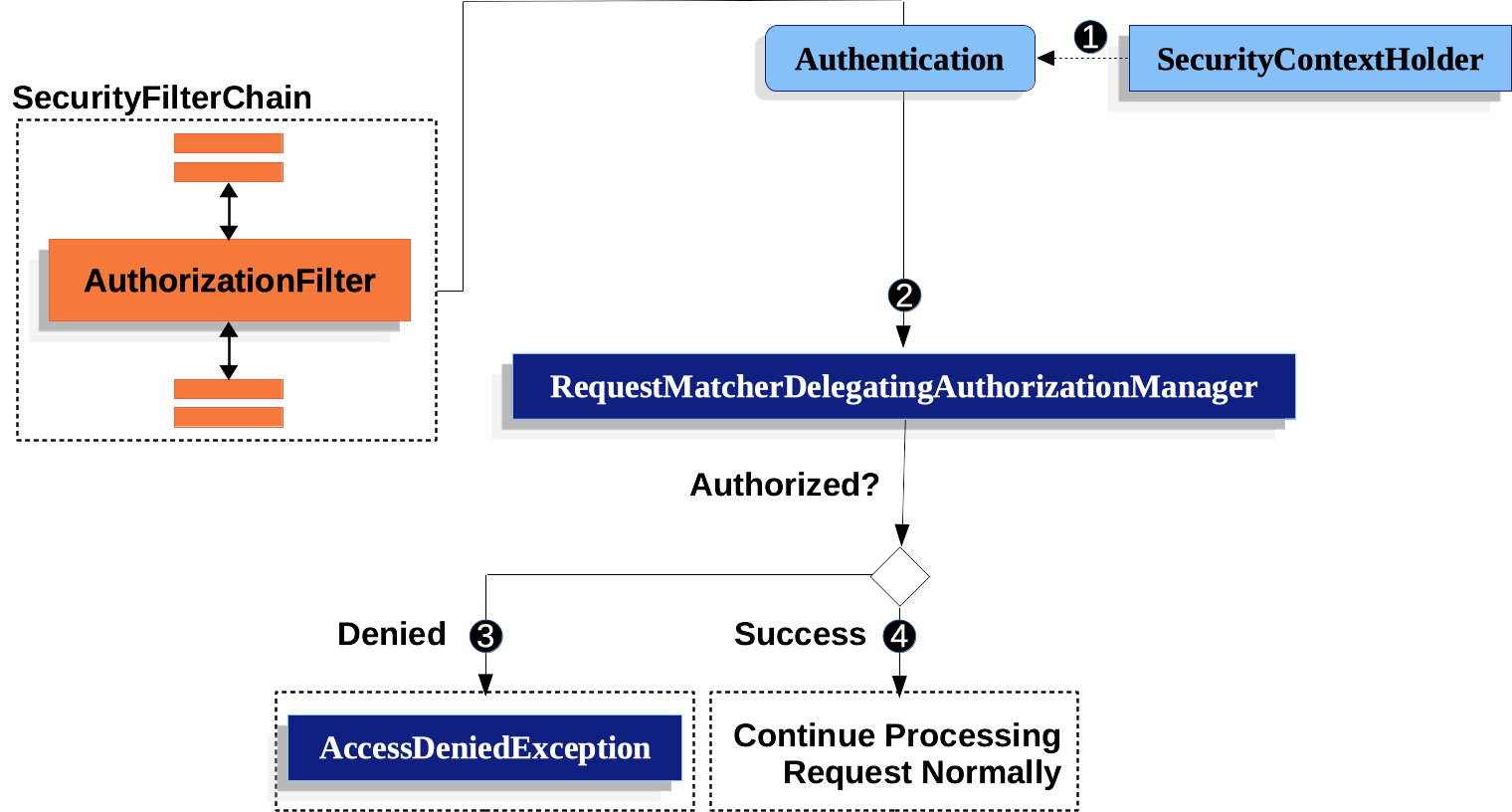
-
 其次,它将
其次,它将Supplier<Authentication>以及HttpServletRequest至AuthorizationManager。 TheAuthorizationManager将请求匹配到authorizeHttpRequests,并运行相应的规则。-
 如果授权被拒绝,已发布一个
 AuthorizationDeniedEvent,以及一个AccessDeniedException被抛出。 在这种情况下,ExceptionTranslationFilter处理AccessDeniedException. -
 如果已授予访问权限,已发布一个
 AuthorizationGrantedEvent和AuthorizationFilter继续提供过滤器链允许应用程序正常处理。
-

AuthorizationFilter默认为最后
AuthorizationFilter 默认位于Spring Security 过滤器链的末尾。
这意味着 Spring Security 的认证过滤器、漏洞防护机制以及其他过滤器集成都不需要授权。
如果你在 AuthorizationFilter 之前添加自己的过滤器,它们也不需要授权;否则,它们将需要授权。
在添加 Spring MVC 端点时,这一点通常变得尤为重要。
因为它们由 DispatcherServlet 执行,而该操作发生在 AuthorizationFilter 之后,因此您的端点需要 包含在 authorizeHttpRequests 中才能被允许访问。
所有调度均已授权
AuthorizationFilter 不仅在每个请求上运行,而且在每次分派(dispatch)时都会运行。
这意味着不仅 REQUEST 分派需要授权,FORWARD、ERROR 和 INCLUDE 分派也同样需要授权。
例如,Spring MVC 可以将请求 FORWARD 到一个视图解析器,由该解析器渲染 Thymeleaf 模板,如下所示:
-
Java
-
Kotlin
@Controller
public class MyController {
    @GetMapping("/endpoint")
    public String endpoint() {
        return "endpoint";
    }
}
@Controller
class MyController {
@GetMapping("/endpoint")
fun endpoint(): String {
return "endpoint"
}
}在这种情况下,授权会发生两次:一次用于授权 /endpoint,另一次用于转发给 Thymeleaf 以渲染“endpoint”模板。
出于这个原因,您可能想要 允许所有 FORWARD 分发。
该原则的另一个示例是Spring Boot 如何处理错误。 如果容器捕获到一个异常,例如如下所示:
-
Java
-
Kotlin
@Controller
public class MyController {
    @GetMapping("/endpoint")
    public String endpoint() {
        throw new UnsupportedOperationException("unsupported");
    }
}
@Controller
class MyController {
@GetMapping("/endpoint")
fun endpoint(): String {
throw UnsupportedOperationException("unsupported")
}
}那么 Boot 将会将其分派到 ERROR 分派器。
在这种情况下,授权也会发生两次:一次用于授权 /endpoint,另一次用于分发错误。
出于这个原因,您可能想要 允许所有 ERROR 分发。
Authentication查找是延迟的
当请求被始终允许或始终拒绝时,这与authorizeHttpRequests相关。
在这些情况下,Authentication不会被查询,从而使请求更快。
授权端点
你可以通过按优先级顺序添加更多规则来配置 Spring Security,以应用不同的规则。
如果你想规定只有拥有 /endpoint 权限的最终用户才能访问 USER,那么你可以这样做:
-
Java
-
Kotlin
-
Xml
@Bean
public SecurityFilterChain web(HttpSecurity http) throws Exception {
    http
        .authorizeHttpRequests((authorize) -> authorize
	    .requestMatchers("/endpoint").hasAuthority("USER")
            .anyRequest().authenticated()
        )
        // ...

    return http.build();
}
@Bean
fun web(http: HttpSecurity): SecurityFilterChain {
http {
authorizeHttpRequests {
authorize("/endpoint", hasAuthority("USER"))
authorize(anyRequest, authenticated)
}
}
return http.build()
}<http>
<intercept-url pattern="/endpoint" access="hasAuthority('USER')"/>
<intercept-url pattern="/**" access="authenticated"/>
</http>如你所见,该声明可以拆分为模式/规则对。
AuthorizationFilter 按照所列顺序处理这些规则对,并仅将第一个匹配项应用于请求。
这意味着,尽管 /** 也会匹配 /endpoint,但上述规则并不会造成问题。
上述规则的解读方式是:“如果请求路径为 /endpoint,则要求具备 USER 权限;否则,仅要求通过身份认证。”
Spring Security 支持多种模式和多种规则;你也可以通过编程方式自行创建每种模式和规则。
授权后,您可以使用Security 的测试支持以如下方式进行测试:
-
Java
@WithMockUser(authorities="USER")
@Test
void endpointWhenUserAuthorityThenAuthorized() {
    this.mvc.perform(get("/endpoint"))
        .andExpect(status().isOk());
}

@WithMockUser
@Test
void endpointWhenNotUserAuthorityThenForbidden() {
    this.mvc.perform(get("/endpoint"))
        .andExpect(status().isForbidden());
}

@Test
void anyWhenUnauthenticatedThenUnauthorized() {
    this.mvc.perform(get("/any"))
        .andExpect(status().isUnauthorized());
}
匹配请求
上面你已经看到了两种匹配请求的方式。
你首先看到的是最简单的形式,即匹配任意请求。
使用 Ant 进行匹配
Ant 是 Spring Security 用于匹配请求的默认语言。
你可以用它来匹配单个端点或一个目录,甚至可以捕获占位符以供后续使用。 你还可以进一步限定它,使其仅匹配特定的 HTTP 方法集合。
假设你不想只匹配 /endpoint 端点,而是希望匹配 /resource 目录下的所有端点。
在这种情况下,你可以采用如下方式:
-
Java
-
Kotlin
-
Xml
http
    .authorizeHttpRequests((authorize) -> authorize
        .requestMatchers("/resource/**").hasAuthority("USER")
        .anyRequest().authenticated()
    )
http {
authorizeHttpRequests {
authorize("/resource/**", hasAuthority("USER"))
authorize(anyRequest, authenticated)
}
}<http>
<intercept-url pattern="/resource/**" access="hasAuthority('USER')"/>
<intercept-url pattern="/**" access="authenticated"/>
</http>这句话的解读方式是:“如果请求路径为 /resource 或其某个子目录,则需要 USER 权限;否则,仅需通过身份认证即可。”
您还可以从请求中提取路径值,如下所示:
-
Java
-
Kotlin
-
Xml
http
    .authorizeHttpRequests((authorize) -> authorize
        .requestMatchers("/resource/{name}").access(new WebExpressionAuthorizationManager("#name == authentication.name"))
        .anyRequest().authenticated()
    )
http {
authorizeHttpRequests {
authorize("/resource/{name}", WebExpressionAuthorizationManager("#name == authentication.name"))
authorize(anyRequest, authenticated)
}
}<http>
<intercept-url pattern="/resource/{name}" access="#name == authentication.name"/>
<intercept-url pattern="/**" access="authenticated"/>
</http>授权后,您可以使用Security 的测试支持以如下方式进行测试:
-
Java
@WithMockUser(authorities="USER")
@Test
void endpointWhenUserAuthorityThenAuthorized() {
this.mvc.perform(get("/endpoint/jon"))
.andExpect(status().isOk());
}
@WithMockUser
@Test
void endpointWhenNotUserAuthorityThenForbidden() {
this.mvc.perform(get("/endpoint/jon"))
.andExpect(status().isForbidden());
}
@Test
void anyWhenUnauthenticatedThenUnauthorized() {
this.mvc.perform(get("/any"))
.andExpect(status().isUnauthorized());
}| Spring Security 仅匹配路径。 如果您想要匹配查询参数,则需要使用自定义的请求匹配器。 |
使用正则表达式进行匹配
Spring Security 支持使用正则表达式来匹配请求。
当你希望对某个子目录应用比 ** 更严格的匹配条件时,这会非常有用。
例如,考虑一个包含用户名的路径,且规则要求所有用户名必须为字母数字字符。
您可以使用 RegexRequestMatcher 来遵守此规则,如下所示:
-
Java
-
Kotlin
-
Xml
http
.authorizeHttpRequests((authorize) -> authorize
.requestMatchers(RegexRequestMatcher.regexMatcher("/resource/[A-Za-z0-9]+")).hasAuthority("USER")
.anyRequest().denyAll()
)http {
authorizeHttpRequests {
authorize(RegexRequestMatcher.regexMatcher("/resource/[A-Za-z0-9]+"), hasAuthority("USER"))
authorize(anyRequest, denyAll)
}
}<http>
<intercept-url request-matcher="regex" pattern="/resource/[A-Za-z0-9]+" access="hasAuthority('USER')"/>
<intercept-url pattern="/**" access="denyAll"/>
</http>按 HTTP 方法匹配
你也可以通过 HTTP 方法来匹配规则。
一个适用这种做法的场景是根据授予的权限进行授权,例如被授予 read(读取)或 write(写入)权限。
要使所有 GET 请求都需要 read 权限,而所有 POST 请求都需要 write 权限,你可以这样做:
-
Java
-
Kotlin
-
Xml
http
.authorizeHttpRequests((authorize) -> authorize
.requestMatchers(HttpMethod.GET).hasAuthority("read")
.requestMatchers(HttpMethod.POST).hasAuthority("write")
.anyRequest().denyAll()
)http {
authorizeHttpRequests {
authorize(HttpMethod.GET, hasAuthority("read"))
authorize(HttpMethod.POST, hasAuthority("write"))
authorize(anyRequest, denyAll)
}
}<http>
<intercept-url http-method="GET" pattern="/**" access="hasAuthority('read')"/>
<intercept-url http-method="POST" pattern="/**" access="hasAuthority('write')"/>
<intercept-url pattern="/**" access="denyAll"/>
</http>这些授权规则应解读为:“如果请求是 GET,则要求具有 read 权限;否则,如果请求是 POST,则要求具有 write 权限;否则,拒绝该请求。”
| 默认拒绝请求是一种良好的安全实践,因为它将规则集转变为允许列表。 |
授权后,您可以使用Security 的测试支持以如下方式进行测试:
-
Java
@WithMockUser(authorities="read")
@Test
void getWhenReadAuthorityThenAuthorized() {
this.mvc.perform(get("/any"))
.andExpect(status().isOk());
}
@WithMockUser
@Test
void getWhenNoReadAuthorityThenForbidden() {
this.mvc.perform(get("/any"))
.andExpect(status().isForbidden());
}
@WithMockUser(authorities="write")
@Test
void postWhenWriteAuthorityThenAuthorized() {
this.mvc.perform(post("/any").with(csrf()))
.andExpect(status().isOk());
}
@WithMockUser(authorities="read")
@Test
void postWhenNoWriteAuthorityThenForbidden() {
this.mvc.perform(get("/any").with(csrf()))
.andExpect(status().isForbidden());
}按调度器类型匹配
| 此功能目前在 XML 中不受支持 |
如前所述,Spring Security 默认会对所有分派类型(dispatcher types)进行授权。
尽管在 xref page 分派上建立的安全上下文会延续到后续的分派中,但细微的不匹配有时仍可能导致意外的 AccessDeniedException。
为了解决这个问题,你可以配置 Spring Security 的 Java 配置,以允许如 FORWARD 和 ERROR 这样的 dispatcher 类型,如下所示:
-
Java
-
Kotlin
http
.authorizeHttpRequests((authorize) -> authorize
.dispatcherTypeMatchers(DispatcherType.FORWARD, DispatcherType.ERROR).permitAll()
.requestMatchers("/endpoint").permitAll()
.anyRequest().denyAll()
)http {
authorizeHttpRequests {
authorize(DispatcherTypeRequestMatcher(DispatcherType.FORWARD), permitAll)
authorize(DispatcherTypeRequestMatcher(DispatcherType.ERROR), permitAll)
authorize("/endpoint", permitAll)
authorize(anyRequest, denyAll)
}
}按 Servlet 路径匹配
一般来说,你可以像上面演示的那样使用 requestMatchers(String)。
但是,如果你有来自多个 Servlet 的授权规则,则需要明确指定这些规则:
-
Java
-
Kotlin
-
Xml
import static org.springframework.security.web.servlet.util.matcher.PathPatternRequestMatcher.withDefaults;
@Bean
SecurityFilterChain appEndpoints(HttpSecurity http) {
PathPatternRequestMatcher.Builder mvc = withDefaults().basePath("/spring-mvc");
http
.authorizeHttpRequests((authorize) -> authorize
.requestMatchers(mvc.matcher("/admin/**")).hasAuthority("admin")
.requestMatchers(mvc.matcher("/my/controller/**")).hasAuthority("controller")
.anyRequest().authenticated()
);
return http.build();
}@Bean
fun appEndpoints(http: HttpSecurity): SecurityFilterChain {
http {
authorizeHttpRequests {
authorize("/spring-mvc", "/admin/**", hasAuthority("admin"))
authorize("/spring-mvc", "/my/controller/**", hasAuthority("controller"))
authorize(anyRequest, authenticated)
}
}
}<http>
<intercept-url servlet-path="/spring-mvc" pattern="/admin/**" access="hasAuthority('admin')"/>
<intercept-url servlet-path="/spring-mvc" pattern="/my/controller/**" access="hasAuthority('controller')"/>
<intercept-url pattern="/**" access="authenticated"/>
</http>这是因为 Spring Security 要求所有 URI 必须是绝对路径(不包括上下文路径)。
|
还有其他几个组件可以为您创建请求匹配器,例如 |
使用自定义匹配器
| 此功能目前在 XML 中不受支持 |
在 Java 配置中,您可以创建自己的 RequestMatcher 并将其提供给 DSL,如下所示:
-
Java
-
Kotlin
RequestMatcher printview = (request) -> request.getParameter("print") != null;
http
.authorizeHttpRequests((authorize) -> authorize
.requestMatchers(printview).hasAuthority("print")
.anyRequest().authenticated()
)val printview: RequestMatcher = { (request) -> request.getParameter("print") != null }
http {
authorizeHttpRequests {
authorize(printview, hasAuthority("print"))
authorize(anyRequest, authenticated)
}
}由于 RequestMatcher 是一个函数式接口,您可以在 DSL 中以 lambda 表达式形式提供它。
然而,如果您需要从请求中提取值,则需要一个具体类,因为这将需要重写 default 方法。 |
授权后,您可以使用Security 的测试支持以如下方式进行测试:
-
Java
@WithMockUser(authorities="print")
@Test
void printWhenPrintAuthorityThenAuthorized() {
this.mvc.perform(get("/any?print"))
.andExpect(status().isOk());
}
@WithMockUser
@Test
void printWhenNoPrintAuthorityThenForbidden() {
this.mvc.perform(get("/any?print"))
.andExpect(status().isForbidden());
}授权请求
一旦请求被匹配,您可以使用几种前面已介绍过的方式对其进行授权,例如permitAll、denyAll和hasAuthority。
作为快速总结,以下是 DSL 中内置的授权规则:
-
permitAll- 请求无需授权,属于公共端点;请注意,在此情况下,Authentication永远不会从会话中检索 -
denyAll- 在任何情况下都不允许该请求;请注意,在此情况下,Authentication永远不会从会话中获取 -
hasAuthority- 请求要求Authentication具有与给定值匹配的 一个GrantedAuthority -
hasRole-hasAuthority的快捷方式,会自动添加ROLE_前缀(或配置的默认前缀) -
hasAnyAuthority- 请求要求Authentication拥有一个GrantedAuthority,其值与所提供的任意一个值匹配。 -
hasAnyRole-hasAnyAuthority的快捷方式,会自动添加ROLE_前缀(或配置的默认前缀) -
access- 请求使用此自定义的AuthorizationManager来确定访问权限
现在你已经了解了这些模式、规则以及它们如何组合使用,应该能够理解这个更复杂示例中所发生的事情了:
-
Java
import static jakarta.servlet.DispatcherType.*;
import static org.springframework.security.authorization.AuthorizationManagers.allOf;
import static org.springframework.security.authorization.AuthorityAuthorizationManager.hasAuthority;
import static org.springframework.security.authorization.AuthorityAuthorizationManager.hasRole;
@Bean
SecurityFilterChain web(HttpSecurity http) throws Exception {
http
// ...
.authorizeHttpRequests(authorize -> authorize (1)
.dispatcherTypeMatchers(FORWARD, ERROR).permitAll() (2)
.requestMatchers("/static/**", "/signup", "/about").permitAll() (3)
.requestMatchers("/admin/**").hasRole("ADMIN") (4)
.requestMatchers("/db/**").access(allOf(hasAuthority("db"), hasRole("ADMIN"))) (5)
.anyRequest().denyAll() (6)
);
return http.build();
}| 1 | 指定了多条授权规则。 每条规则将按照其声明的顺序进行评估。 |
| 2 | 允许进行 FORWARD 和 ERROR 转发,以便 Spring MVC 渲染视图,以及 Spring Boot 渲染错误。 |
| 3 | 我们指定了多个URL模式,任何用户都可以访问。 具体来说,如果URL以“/static/”开头,或等于“/signup”,或等于“/about”,则任何用户都可以访问该请求。 |
| 4 | 任何以“/admin/”开头的 URL 都将仅限拥有“ROLE_ADMIN”角色的用户访问。
你会注意到,由于我们调用了 hasRole 方法,因此无需显式指定“ROLE_”前缀。 |
| 5 | 任何以“/db/”开头的 URL 都要求用户同时具备“db”权限和“ROLE_ADMIN”角色。
你会注意到,由于我们使用了 hasRole 表达式,因此无需显式指定“ROLE_”前缀。 |
| 6 | 任何尚未被匹配的 URL 都将被拒绝访问。 如果你不希望意外地忘记更新你的授权规则,这是一个很好的策略。 |
使用 SpEL 表达授权
虽然推荐使用具体的 AuthorizationManager,但在某些情况下仍需使用表达式,例如在 <intercept-url> 或 JSP 标签库(Taglibs)中。
因此,本节将重点介绍这些领域的示例。
鉴于这一点,让我们更深入地了解一下 Spring Security 的 Web 安全授权 SpEL API。
Spring Security 将其所有的授权字段和方法封装在一组根对象中。
最通用的根对象称为 SecurityExpressionRoot,它是 WebSecurityExpressionRoot 的基础。
Spring Security 在准备评估授权表达式时,会将此根对象提供给 StandardEvaluationContext。
使用授权表达式字段和方法
这首先为您的 SpEL 表达式提供了一组增强的授权字段和方法。 以下是对最常用方法的快速概述:
-
permitAll- 该请求无需授权即可调用;请注意,在这种情况下,Authentication永远不会从会话中检索 -
denyAll- 在任何情况下都不允许该请求;请注意,在此情况下,Authentication永远不会从会话中获取 -
hasAuthority- 请求要求Authentication具有与给定值匹配的 一个GrantedAuthority -
hasRole-hasAuthority的快捷方式,会自动添加ROLE_前缀(或配置的默认前缀) -
hasAnyAuthority- 请求要求Authentication拥有一个GrantedAuthority,其值与所提供的任意一个值匹配。 -
hasAnyRole-hasAnyAuthority的快捷方式,会自动添加ROLE_前缀(或配置的默认前缀) -
hasPermission- 用于接入您的PermissionEvaluator实例,以执行对象级别的授权
以下是常见字段的简要介绍:
-
authentication- 与该方法调用关联的Authentication实例 -
principal- 与该方法调用关联的Authentication#getPrincipal
现在你已经了解了这些模式、规则以及它们如何组合使用,应该能够理解这个更复杂示例中所发生的事情了:
-
Xml
<http>
<intercept-url pattern="/static/**" access="permitAll"/> (1)
<intercept-url pattern="/admin/**" access="hasRole('ADMIN')"/> (2)
<intercept-url pattern="/db/**" access="hasAuthority('db') and hasRole('ADMIN')"/> (3)
<intercept-url pattern="/**" access="denyAll"/> (4)
</http>| 1 | 我们指定了一个URL模式,任何用户都可以访问。 具体来说,如果URL以“/static/”开头,则任何用户都可以访问该请求。 |
| 2 | 任何以“/admin/”开头的 URL 都将仅限拥有“ROLE_ADMIN”角色的用户访问。
你会注意到,由于我们调用了 hasRole 方法,因此无需显式指定“ROLE_”前缀。 |
| 3 | 任何以“/db/”开头的 URL 都要求用户同时具备“db”权限和“ROLE_ADMIN”角色。
你会注意到,由于我们使用了 hasRole 表达式,因此无需显式指定“ROLE_”前缀。 |
| 4 | 任何尚未被匹配的 URL 都将被拒绝访问。 如果你不希望意外地忘记更新你的授权规则,这是一个很好的策略。 |
使用路径参数
此外,Spring Security 还提供了一种机制用于发现路径参数,以便在 SpEL 表达式中也能访问这些参数。
例如,你可以通过以下方式在 SpEL 表达式中访问路径参数:
-
Xml
<http>
    <intercept-url pattern="/resource/{name}" access="#name == authentication.name"/>
    <intercept-url pattern="/**" access="authenticated"/>
</http>此表达式引用 /resource/ 之后的路径变量,并要求其等于 Authentication#getName。
使用授权数据库、策略代理或其他服务
如果你想配置 Spring Security 使用单独的服务进行授权,可以创建自己的 AuthorizationManager 并将其与 anyRequest 进行匹配。
首先,您的AuthorizationManager可能看起来像这样:
-
Java
@Component
public final class OpenPolicyAgentAuthorizationManager implements AuthorizationManager<RequestAuthorizationContext> {
    @Override
    public AuthorizationDecision check(Supplier<Authentication> authentication, RequestAuthorizationContext context) {
        // make request to Open Policy Agent
    }
}
然后,你可以通过以下方式将其集成到 Spring Security 中:
-
Java
@Bean
SecurityFilterChain web(HttpSecurity http, AuthorizationManager<RequestAuthorizationContext> authz) throws Exception {
	http
		// ...
		.authorizeHttpRequests((authorize) -> authorize
            .anyRequest().access(authz)
		);

	return http.build();
}收藏permitAll完成ignoring
当你拥有静态资源时,可能会倾向于配置过滤器链以忽略这些资源。
更安全的做法是使用 permitAll 来允许访问它们,如下所示:
-
Java
-
Kotlin
http
    .authorizeHttpRequests((authorize) -> authorize
        .requestMatchers("/css/**").permitAll()
        .anyRequest().authenticated()
    )
http {
authorizeHttpRequests {
authorize("/css/**", permitAll)
authorize(anyRequest, authenticated)
}
}它更加安全,因为即使是静态资源,写入安全头信息也很重要,而如果请求被忽略,Spring Security 就无法做到这一点。
过去,这样做会带来性能上的权衡,因为 Spring Security 在每个请求上都会访问会话。
然而,从 Spring Security 6 开始,除非授权规则明确要求,否则将不再频繁访问会话。
由于性能影响现已得到解决,Spring Security 建议对所有请求至少使用 permitAll。
从...迁移authorizeRequests
AuthorizationFilter 取代了 FilterSecurityInterceptor。
为了保持向后兼容性,FilterSecurityInterceptor 仍作为默认值。
本节将讨论 AuthorizationFilter 的工作原理以及如何覆盖默认配置。 |
AuthorizationFilter为HttpServletRequests提供授权。
它作为安全过滤器之一被插入到FilterChainProxy中。
在声明 SecurityFilterChain 时,您可以覆盖默认配置。
不要使用 authorizeRequests,而应使用 authorizeHttpRequests,如下所示:
-
Java
@Bean
SecurityFilterChain web(HttpSecurity http) throws AuthenticationException {
    http
        .authorizeHttpRequests((authorize) -> authorize
            .anyRequest().authenticated();
        )
        // ...

    return http.build();
}
这在多个方面改进了 authorizeRequests:
-
使用简化的
AuthorizationManagerAPI,取代元数据源、配置属性、决策管理器和投票器。 这简化了重用和自定义。 -
延迟
Authentication的查找。 身份验证不再需要在每个请求中都进行查找,而仅在那些授权决策需要身份验证的请求中才执行查找。 -
基于 Bean 的配置支持。
当使用 authorizeHttpRequests 而不是 authorizeRequests 时,将使用 AuthorizationFilter 而不是 FilterSecurityInterceptor。
迁移表达式
在可能的情况下,建议使用类型安全的授权管理器来代替 SpEL。
对于 Java 配置,WebExpressionAuthorizationManager 可用于帮助迁移遗留的 SpEL。
要使用 WebExpressionAuthorizationManager,你可以用你想要迁移的表达式来构造一个实例,如下所示:
-
Java
-
Kotlin
.requestMatchers("/test/**").access(new WebExpressionAuthorizationManager("hasRole('ADMIN') && hasRole('USER')")).requestMatchers("/test/**").access(WebExpressionAuthorizationManager("hasRole('ADMIN') && hasRole('USER')"))如果你在表达式中像这样引用一个 bean:@webSecurity.check(authentication, request),建议你改为直接调用该 bean,其形式大致如下:
-
Java
-
Kotlin
.requestMatchers("/test/**").access((authentication, context) ->
    new AuthorizationDecision(webSecurity.check(authentication.get(), context.getRequest())))
.requestMatchers("/test/**").access((authentication, context): AuthorizationManager<RequestAuthorizationContext> ->
AuthorizationDecision(webSecurity.check(authentication.get(), context.getRequest())))对于包含 Bean 引用以及其他表达式的复杂指令,建议您将其修改为实现 AuthorizationManager 接口,并通过调用 .access(AuthorizationManager) 来引用它们。
如果您无法做到这一点,可以配置一个带有 bean 解析器的 DefaultHttpSecurityExpressionHandler,并将其提供给 WebExpressionAuthorizationManager#setExpressionhandler。
安全匹配器
RequestMatcher 接口用于确定请求是否与给定规则匹配。
我们使用 securityMatchers 来判断是否应将 给定的 HttpSecurity 应用于特定请求。
同样,我们可以使用 requestMatchers 来确定应应用于特定请求的授权规则。
请查看以下示例:
-
Java
-
Kotlin
@Configuration
@EnableWebSecurity
public class SecurityConfig {

	@Bean
	public SecurityFilterChain securityFilterChain(HttpSecurity http) throws Exception {
		http
			.securityMatcher("/api/**")                            (1)
			.authorizeHttpRequests(authorize -> authorize
				.requestMatchers("/api/user/**").hasRole("USER")   (2)
				.requestMatchers("/api/admin/**").hasRole("ADMIN") (3)
				.anyRequest().authenticated()                      (4)
			)
			.formLogin(withDefaults());
		return http.build();
	}
}
@Configuration
@EnableWebSecurity
open class SecurityConfig {
@Bean
open fun web(http: HttpSecurity): SecurityFilterChain {
http {
securityMatcher("/api/**") (1)
authorizeHttpRequests {
authorize("/api/user/**", hasRole("USER")) (2)
authorize("/api/admin/**", hasRole("ADMIN")) (3)
authorize(anyRequest, authenticated) (4)
}
}
return http.build()
}
}| 1 | 配置 HttpSecurity 仅应用于以 /api/ 开头的 URL |
| 2 | 允许具有 /api/user/ 角色的用户访问以 USER 开头的 URL |
| 3 | 允许具有 /api/admin/ 角色的用户访问以 ADMIN 开头的 URL |
| 4 | 任何不匹配上述规则的其他请求都将需要身份验证 |
securityMatcher(s) 和 requestMatcher(s) 方法将决定哪种 RequestMatcher 实现最适合您的应用程序:如果类路径中存在 Spring MVC,则将使用 MvcRequestMatcher;否则,将使用 AntPathRequestMatcher。
您可以在此处阅读更多关于 Spring MVC 集成的信息。
如果你想使用特定的RequestMatcher,只需将其实现传递给securityMatcher和/或requestMatcher方法即可:
-
Java
-
Kotlin
import static org.springframework.security.web.util.matcher.AntPathRequestMatcher.antMatcher; (1)
import static org.springframework.security.web.util.matcher.RegexRequestMatcher.regexMatcher;

@Configuration
@EnableWebSecurity
public class SecurityConfig {

	@Bean
	public SecurityFilterChain securityFilterChain(HttpSecurity http) throws Exception {
		http
			.securityMatcher(antMatcher("/api/**"))                              (2)
			.authorizeHttpRequests(authorize -> authorize
				.requestMatchers(antMatcher("/api/user/**")).hasRole("USER")     (3)
				.requestMatchers(regexMatcher("/api/admin/.*")).hasRole("ADMIN") (4)
				.requestMatchers(new MyCustomRequestMatcher()).hasRole("SUPERVISOR")     (5)
				.anyRequest().authenticated()
			)
			.formLogin(withDefaults());
		return http.build();
	}
}

public class MyCustomRequestMatcher implements RequestMatcher {

    @Override
    public boolean matches(HttpServletRequest request) {
        // ...
    }
}
import org.springframework.security.web.util.matcher.AntPathRequestMatcher.antMatcher (1)
import org.springframework.security.web.util.matcher.RegexRequestMatcher.regexMatcher
@Configuration
@EnableWebSecurity
open class SecurityConfig {
@Bean
open fun web(http: HttpSecurity): SecurityFilterChain {
http {
securityMatcher(antMatcher("/api/**")) (2)
authorizeHttpRequests {
authorize(antMatcher("/api/user/**"), hasRole("USER")) (3)
authorize(regexMatcher("/api/admin/**"), hasRole("ADMIN")) (4)
authorize(MyCustomRequestMatcher(), hasRole("SUPERVISOR")) (5)
authorize(anyRequest, authenticated)
}
}
return http.build()
}
}| 1 | 从AntPathRequestMatcher和RegexRequestMatcher导入静态工厂方法,以创建RequestMatcher实例。 |
| 2 | 配置 HttpSecurity,使其仅应用于以 /api/ 开头的 URL,使用 AntPathRequestMatcher |
| 3 | 使用 /api/user/,允许具有 USER 角色的用户访问以 AntPathRequestMatcher 开头的 URL |
| 4 | 使用 /api/admin/,允许具有 ADMIN 角色的用户访问以 RegexRequestMatcher 开头的 URL |
| 5 | 允许具有 MyCustomRequestMatcher 角色的用户访问与 SUPERVISOR 匹配的 URL,使用自定义的 RequestMatcher |